World Map 2D
Template:
templates/world-map-2d
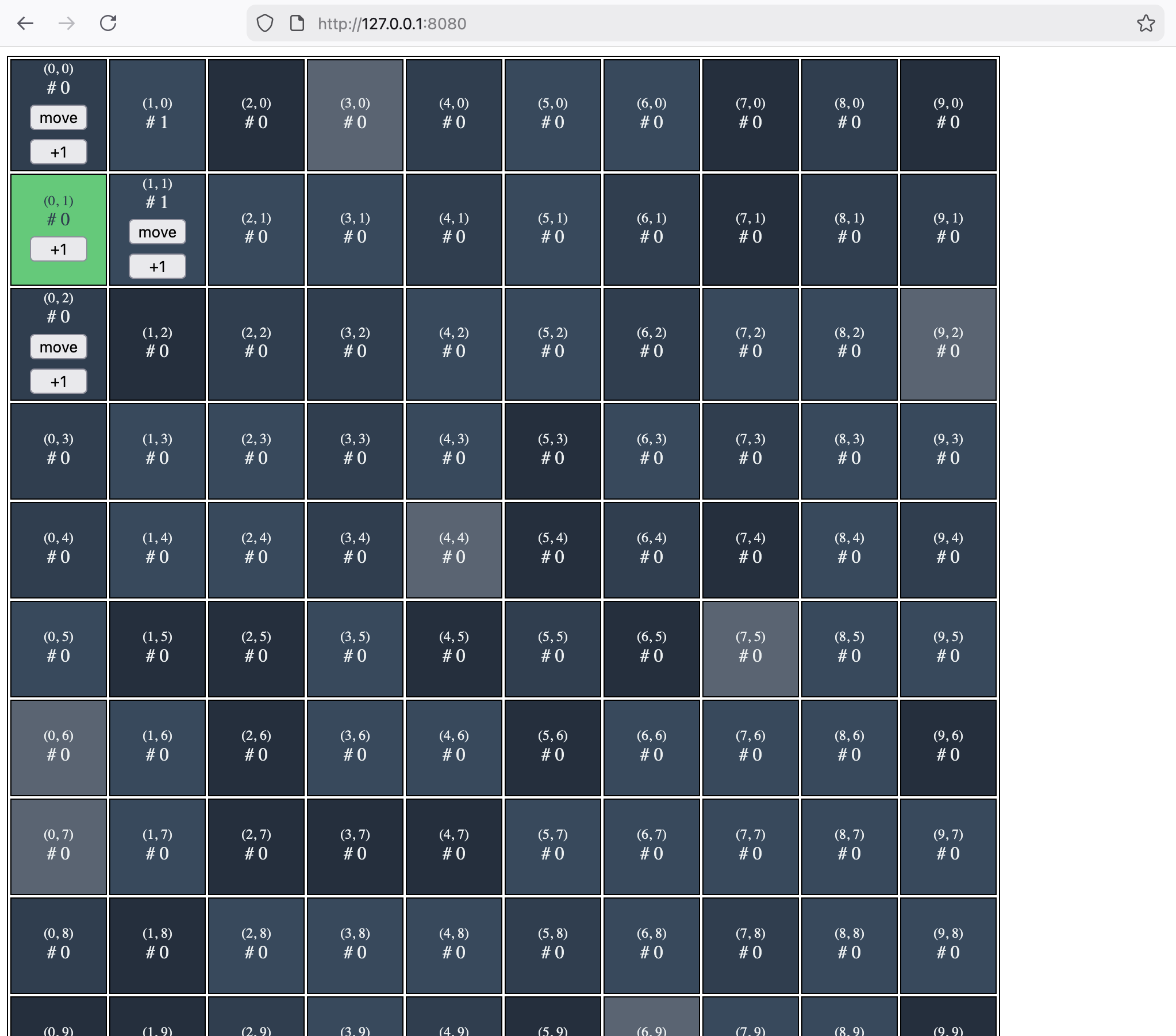
Players join a shared grid, walk around it, and bump a per-cell visit counter. Every action is an on-chain input to an Effectstream L2 contract on a local Hardhat chain; the sync node replays those inputs deterministically into two Postgres tables, and a plain HTML page renders the grid from the node's REST API.
It is the smallest complete example of spatial state — position that must stay inside a world, and world cells that accumulate history. Read it if you are building tile movement, territory, location-gated actions, or anything else where "where is this player" is part of consensus state.
What this template shows
The map is data, not code. The 10×10 world is not a constant in the state machine; it is 100
rows inserted by the migration in packages/database/src/migrations/database.sql, and player
positions point at those rows through a composite foreign key:
CREATE TABLE global_world_state (
  x INTEGER NOT NULL,
  y INTEGER NOT NULL,
  can_visit BOOLEAN NOT NULL,
  counter INTEGER NOT NULL DEFAULT 0,
  PRIMARY KEY (x, y)
);

CREATE TABLE global_user_state (
  wallet TEXT NOT NULL PRIMARY KEY,
  x INTEGER NOT NULL,
  y INTEGER NOT NULL,
  FOREIGN KEY (x, y) REFERENCES global_world_state (x, y)
);
So validation is declarative, and the transitions are one line each. Coordinate bounds are
enforced by TypeBox in packages/node/grammar.ts (Type.Number({ minimum: 0, maximum: 9 })), so
an out-of-range input never reaches a transition. Cell existence is enforced by the foreign key.
What is left in packages/node/state-machine.ts is a single World.resolve per action — no
guards, no lookups, no branching:
stm.addStateTransition("submitMove", function* (data) {
  const { signerAddress: wallet, parsedInput } = data;
  const { x, y } = parsedInput;
  yield* World.resolve(updateUserGlobalPosition, { wallet, x, y });
});
Reshaping the world — a bigger grid, holes, cells flagged can_visit = FALSE — is a migration
edit plus a grammar bound. The state machine does not change.
And it shows where that stops. The adjacency rule players actually feel lives in the browser:
inrange() in packages/frontend/index.html only draws move / +1 buttons on orthogonally
neighbouring cells. Nothing on chain enforces it — the grammar accepts any in-bounds (x, y), so
a hand-crafted transaction can teleport. That is the honest lesson of the template: rules you want
enforced belong in the grammar, the schema, or the transition; a rule in the UI is only an
affordance.
Effectstream features used
| Feature | Where | Used for |
|---|---|---|
TypeBox grammar (@effectstream/concise) | packages/node/grammar.ts | Declares joinWorld / submitMove / submitIncrement and bounds both coordinates to 0..9. |
@effectstream/sm Stm state machine | packages/node/state-machine.ts | Routes each parsed input to a generator transition. |
@effectstream/coroutine World.resolve | packages/node/state-machine.ts | Queues the pgtyped query + params as the transition's only effect. |
EVM sync via PrimitiveTypeEVMEffectstreamL2 | packages/node/config.dev.ts | Turns effectstreamSubmitGameInput calls on MyEffectstreamL2 into grammar inputs. |
| NTP main sync protocol | packages/node/config.dev.ts | ConfigSyncProtocolType.NTP_MAIN with blockTimeMS: 1000 drives the block clock; the EVM RPC protocol is attached as a parallel chain. |
Effectstream L2 contract (@effectstream/evm-contracts) | packages/contracts-evm/src/contracts/MyEffectstreamL2.sol | The on-chain mailbox; deployed with Hardhat Ignition. |
DB migrations (migrationTable) | packages/database/src/migration-order.ts | Applies database.sql, which creates both tables and seeds all 100 world cells. |
| pgtyped typed queries | packages/database/src/sql/ | .sql files compiled to *.queries.ts; the node imports the generated query objects by name. |
runPreparedQuery (@effectstream/db) | packages/node/api.ts | Serializes reads behind the PGLite mutex (a no-op against a real Postgres). |
Custom Fastify API router (StartConfigApiRouter) | packages/node/api.ts | Adds GET /user_stats and GET /world_stats to the node's HTTP server. |
@effectstream/wallets | packages/frontend/index.js | walletLogin in both EvmInjected (MetaMask) and EvmViem (local private key) modes, plus sendTransaction. |
Orchestrator (@effectstream/orchestrator) | start.dev.ts | Boots PGLite, Hardhat + contract deploy, the sync node, and the frontend in dependency order. |
Quick start
Prerequisites:
- Bun — the runtime for everything here.
- Node.js — Hardhat and the frontend's
esbuild.jsrun under Node ("build": "node esbuild.js"). - Foundry —
forgemust be on yourPATH;launchEvmchecks for it up front and refuses to start without it. - Chrome or Chromium — only for the browser tests (
CHROME_PATHoverrides detection).
bun install
bun run dev
bun run dev runs bunx orchestrator start, which picks up start.dev.ts from the
effectstream.default field in package.json and brings up the whole stack — including the
frontend build and server, so no second terminal is needed.
| Service | URL |
|---|---|
| Frontend | http://localhost:10599 |
| Sync node API | http://localhost:9999 |
| Hardhat JSON-RPC | http://localhost:8545 (WebSocket on 8546) |
| PGLite (Postgres wire protocol) | postgres://postgres:postgres@localhost:5432/postgres |
| Orchestrator control API | http://localhost:4747 |
On the page, Connect Local Wallet (dev) signs with Hardhat account #0 through
WalletMode.EvmViem — no browser extension required, which is also what makes the headless
end-to-end test possible. Connect Browser Wallet uses WalletMode.EvmInjected; for that,
point MetaMask at http://localhost:8545 (chain ID 31337) and import a Hardhat key:
0xac0974bec39a17e36ba4a6b4d238ff944bacb478cbed5efcae784d7bf4f2ff80
⚠️ That key is baked into Hardhat and publicly known. Local development only — never send real funds to it or reuse it on a live network.
The deployed contract charges fee: 0 (see packages/contracts-evm/deploy.ts), so submitting an
input costs gas only.
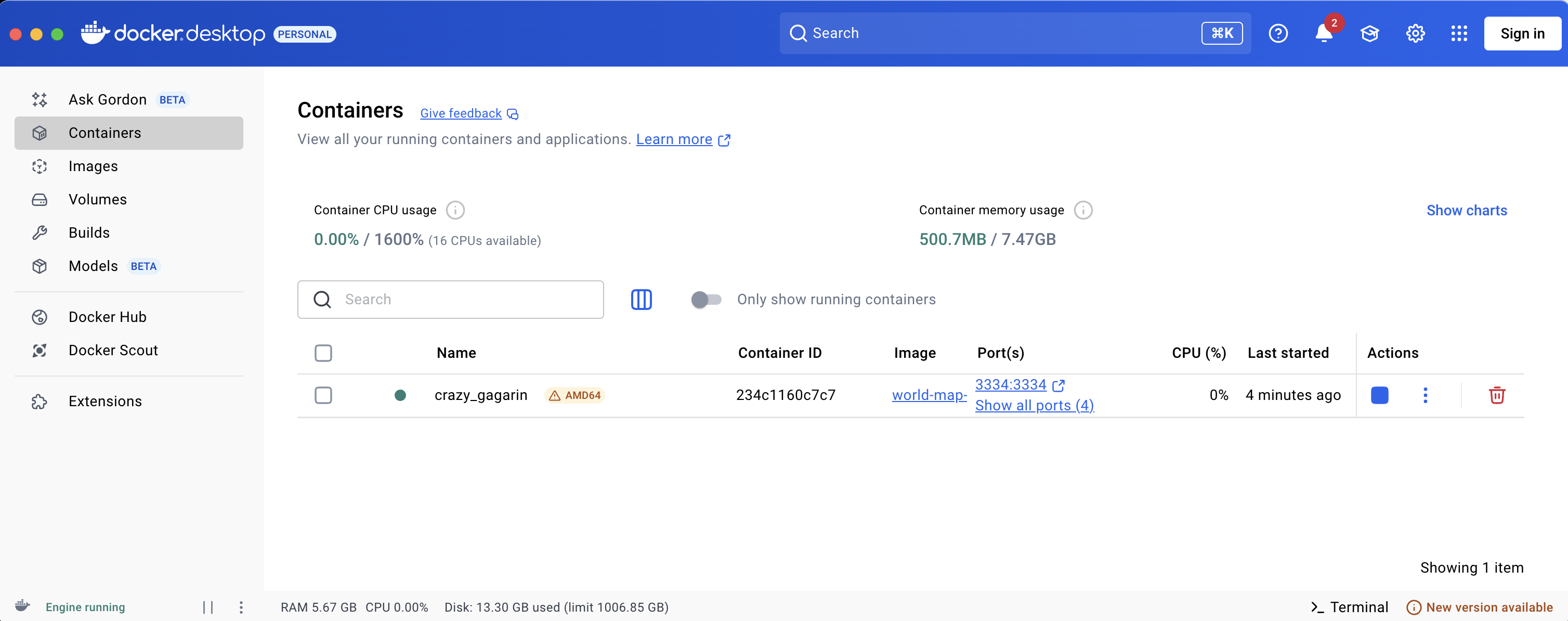
Docker
The Dockerfile builds the entire stack — Bun, Node, Foundry, a pre-cached solc 0.8.30, the
compiled contracts — into one image, whose CMD is
bunx orchestrator start --config start.dev.ts: the same stack bun run dev gives you. It is
architecture-aware (it selects the arm64 or amd64 Foundry build), so it runs natively on Apple
Silicon.
docker build -f Dockerfile . -t world-map-2d
docker run -p 9999:9999 -p 10599:10599 world-map-2d
The image declares EXPOSE 8545 8546 9999 10599; publish 8545 as well if you want to attach a
browser wallet to the container's chain. To run the test suite inside the image:
docker run world-map-2d bun run test
Project structure
world-map-2d/
├── start.dev.ts                       # Orchestrator config: PGLite + Hardhat + sync + frontend
├── Dockerfile                         # Single-container build of the whole stack
├── link.sh                            # Symlink local @effectstream/* packages (monorepo dev)
└── packages/
    ├── contracts-evm/                 # MyEffectstreamL2 + Hardhat/Foundry/Ignition setup
    │   ├── src/contracts/MyEffectstreamL2.sol
    │   ├── ignition/modules/effectstreamL2.ts
    │   ├── deploy.ts                  # Ignition deployment (owner + fee parameters)
    │   ├── hardhat.config.ts
    │   └── foundry.toml
    ├── database/                      # Schema + pgtyped queries
    │   ├── src/migrations/database.sql # Two tables and the 100 seeded world cells
    │   ├── src/sql/{select,insert,update}.sql
    │   ├── src/migration-order.ts     # Exports migrationTable
    │   └── src/mod.ts
    ├── node/                          # Sync node
    │   ├── main.dev.ts                # Entry point: init + start
    │   ├── config.dev.ts              # Networks, sync protocols, EVM primitive
    │   ├── grammar.ts                 # Input grammar
    │   ├── state-machine.ts           # Three transitions
    │   └── api.ts                     # /user_stats and /world_stats
    ├── frontend/                      # Vanilla HTML/JS client
    │   ├── index.js                   # Wallet + API bindings exposed as window.worldMap2D
    │   ├── index.html                 # Grid rendering and click handlers
    │   ├── style.css
    │   ├── esbuild.js                 # Bundles index.js -> dist/min.js, copies html + css
    │   └── server.ts                  # Fastify static server on port 10599
    └── tests/                         # Three-phase integration suite
        ├── run-tests.ts               # Runner: boots the stack, then phases A/B/C
        ├── start.test.ts              # Orchestrator config used by the tests
        ├── infra/{chain-ready,deploy}.test.ts
        ├── stm/{actions,api}.test.ts
        └── frontend/{build-smoke,render,interactions,e2e}.test.ts
How it works
Grammar
Three commands, with the world's dimensions expressed as TypeBox bounds
(packages/node/grammar.ts):
export const grammar = {
  joinWorld: [],
  submitMove: [
    ["x", Type.Number({ minimum: 0, maximum: 9 })],
    ["y", Type.Number({ minimum: 0, maximum: 9 })],
  ],
  submitIncrement: [
    ["x", Type.Number({ minimum: 0, maximum: 9 })],
    ["y", Type.Number({ minimum: 0, maximum: 9 })],
  ],
} as const satisfies GrammarDefinition;
On the wire an input is a JSON array — ["joinWorld"], ["submitMove", 3, 4],
["submitIncrement", 5, 5] — hex-encoded into the contract call.
State machine
packages/node/state-machine.ts is the whole of the game logic:
const stm = new Stm<typeof grammar, {}>(grammar);

stm.addStateTransition("joinWorld", function* (data) {
  const { signerAddress: wallet } = data;
  yield* World.resolve(createGlobalUserState, { wallet, x: 0, y: 0 });
});

stm.addStateTransition("submitMove", function* (data) {
  const { signerAddress: wallet, parsedInput } = data;
  const { x, y } = parsedInput;
  yield* World.resolve(updateUserGlobalPosition, { wallet, x, y });
});

stm.addStateTransition("submitIncrement", function* (data) {
  const { parsedInput } = data;
  const { x, y } = parsedInput;
  yield* World.resolve(updateWorldStateCounter, { x, y });
});
World.resolve takes a pgtyped query object and its parameters, so a transition describes an
update rather than executing one — that is what keeps replay deterministic. joinWorld uses
ON CONFLICT (wallet) DO NOTHING, so re-joining is idempotent, and submitIncrement needs no
signer at all: bumping a cell's counter is world state, not player state.
main.dev.ts wires these together with the config, the migrations, and the API router:
yield* start({
  appName: "world-map-2d",
  appVersion: "1.0.0",
  syncInfo: toSyncProtocolWithNetwork(config),
  gameStateTransitions,
  migrations: migrationTable,
  apiRouter,
  grammar,
});
Contracts
packages/contracts-evm/src/contracts/MyEffectstreamL2.sol is the stock L2 mailbox with nothing
added:
contract MyEffectstreamL2 is EffectstreamL2Contract {
    constructor(address _owner, uint256 _fee) EffectstreamL2Contract(_owner, _fee) {}
}
Hardhat Ignition deploys it as EffectstreamL2Module#MyEffectstreamL2, and config.dev.ts reads
the address back out of the generated bindings rather than hardcoding it:
contractAddress:
  contractAddressesEvmMain()
    .chain31337["EffectstreamL2Module#MyEffectstreamL2"],
paimaL2Grammar: grammar,
The primitive is PrimitiveTypeEVMEffectstreamL2 on the mainEvmRPC sync protocol
(EVM_RPC_PARALLEL, 500 ms polling, confirmation depth 1), running in parallel with an
NTP_MAIN clock at one block per second.
API
packages/node/api.ts registers two read endpoints on the node's Fastify server:
server.get("/user_stats", async (request, reply) => {
  const { wallet } = request.query as { wallet: string };
  if (!wallet) {
    return reply.code(400).send({ error: "wallet parameter required" });
  }
  const [userStats] = await runPreparedQuery(
    getUserStats.run({ wallet }, dbConn),
    "getUserStats"
  );
  return reply.send(userStats || null);
});
curl "http://localhost:9999/user_stats?wallet=0xf39fd6e51aad88f6f4ce6ab8827279cfffb92266"
curl "http://localhost:9999/world_stats"
/user_stats returns the global_user_state row (wallet, x, y) or null for a wallet that
has not joined. Wallet addresses are stored lowercase, so query with a lowercased address.
/world_stats returns every can_visit = TRUE cell — all 100 of them — each with x, y,
counter and can_visit. Both reads go through runPreparedQuery, which takes the PGLite mutex
while a query is in flight; against a real Postgres it passes straight through.
Database
Queries live as annotated SQL and are compiled by pgtyped into *.queries.ts, which
packages/database/src/mod.ts re-exports. The three the node uses:
/* @name getAllWorldStats */
SELECT * FROM global_world_state
WHERE can_visit = TRUE
;

/* @name updateWorldStateCounter */
UPDATE global_world_state
SET counter = counter + 1
WHERE can_visit = TRUE
AND x = :x!
AND y = :y!
;
Note that the increment query re-checks can_visit, so flipping a cell off in the data disables
it without touching TypeScript. Never hand-edit the generated *.queries.ts; after changing any
.sql file, regenerate:
bun run build:pgtypes
(That runs pgtyped:update in packages/database, which reads the connection settings from
packages/database/pgtypedconfig.json — postgres:postgres@localhost:5432, i.e. the running dev
database.)
Frontend
packages/frontend/index.js is the only module the page loads; it exposes wallet and fetch
helpers on window.worldMap2D, and index.html does the rendering. Actions are submitted with
sendTransaction at the "wait-receipt" confirmation level:
async function submitMove(x, y) {
  if (!wallet) throw new Error("Connect a wallet first");
  return await sendTransaction(
    wallet,
    ["submitMove", x, y],
    effectstreamConfig,
    "wait-receipt",
  );
}
The source comment explains the choice: "wait-receipt" confirms the chain has the transaction,
while indexing and the database write land a beat later — the page re-renders on a timer rather
than subscribing to the MQTT stream. esbuild.js bundles this to dist/min.js and copies
index.html and style.css alongside it; server.ts serves dist/ with @fastify/static on
port 10599. (Both are run for you by the frontend-build and frontend-server orchestrator
processes.) The bundler stubs out @lucid-evolution/* and @midnight-ntwrk/* — optional peer
dependencies of @effectstream/wallets that this EVM-only template never reaches.
Configuration
The template targets the local Hardhat chain and has no .env. Networks are declared inline in
packages/node/config.dev.ts via addViemNetwork({ ...hardhat, name: "evmMain" }), and the
security namespace is world-map-2d-node.
| Variable | Default | Effect |
|---|---|---|
NODE_ENV | set to development by bun run dev | Development mode for the orchestrator and node. |
PGLITE | true (set by start.dev.ts for the sync process) | Use embedded PGLite; false makes the orchestrator wait for an external Postgres instead of starting one. |
DB_PORT | 5432 | Port of that external Postgres, and the port the test runner connects to. |
EFFECTSTREAM_API_PORT | 9999 | Node HTTP API port. |
ENABLE_DEV_AND_DEBUG_ENDPOINTS | unset (true under packages/tests/start.test.ts) | Exposes the node's debug endpoints. |
CHROME_PATH | autodetected | Browser binary for the Playwright-driven tests. |
To point the node at a real EVM network, replace the hardhat chain in config.dev.ts with the
target chain and set startBlockHeight on the mainEvmRPC protocol and the primitive; then
update the contract address in packages/frontend/index.js, which is currently pinned to the
deterministic local Ignition address 0x5FbDB2315678afecb367f032d93F642f64180aa3.
Other root scripts:
bun run build:evm       # compile contracts and regenerate the TypeScript bindings
bun run build:pgtypes   # regenerate pgtyped query types
bun run check           # typecheck the node package
If you are working inside the Effectstream monorepo and want your local @effectstream/* sources
instead of the published 0.102.0 packages, run ./link.sh in place of bun install.
Testing
bun run test
packages/tests/run-tests.ts starts its own orchestrator from packages/tests/start.test.ts,
waits on the control API, and runs three phases:
- Phase A — infrastructure: the chain answers
eth_chainIdwith31337on port 8545, andMyEffectstreamL2deploys to a well-formed address. - Phase B — state machine, database, API: submits
["joinWorld"],["submitMove", 3, 4]and["submitIncrement", 5, 5]straight toeffectstreamSubmitGameInputwith viem (there is no batcher here), then polls Postgres untilglobal_user_stateshows the wallet at(0,0)and then(3,4), andglobal_world_stateat(5,5)has a higher counter than before. It then checks both REST endpoints report the same values. The increment assertion is written as a delta, not an absolute, so repeated runs against a warm database stay green. - Phase C — frontend: the esbuild bundle builds cleanly, the served page renders, its
interactions work, and a headless Chromium drives the full flow — connect the local
EvmViemwallet, render the grid at the current position, click a move button, watch the cell repaint.
The runner tears the stack down in a finally block and exits non-zero if any assertion failed.
Where to go next
- Grammar — how input schemas are declared and parsed, and what else you can express in a bound.
- State machine — the transition model this template keeps deliberately thin.
- Database — migrations and the
pgtyped workflow behind
build:pgtypes. - Effectstream L2 contract —
what
effectstreamSubmitGameInputdoes on chain. hex-battle— the next step up for grid games: hex coordinates, lobbies, simultaneous hidden moves, and rules in a shared engine package rather than in the schema.minimal— the same EVM stack with a single action, if this one has more moving parts than you want.